
Why this workaround exists
Apple Pay, PayPal, Google Pay and Revolut are how most people pay for everything else online — but most online casinos don't accept them directly at the cashier. The reason sits with the payment networks, not you: card wallets and PayPal restrict gambling merchants in many regions, so the buttons simply never appear.
There is an honest way around it. Instead of paying the casino with Apple Pay, you use Apple Pay (or PayPal, Google Pay or Revolut) to buy a small amount of crypto through a built-in on-ramp, then play with that crypto. It's an extra step and it has real downsides — covered below — but it works, and it's completely above board.
How it works, step by step
You need a casino with a crypto on-ramp built into its cashier. One that has this is Rollbit, where the on-ramp is powered by Jupiter (see our full Rollbit review for how the rest of the site works).
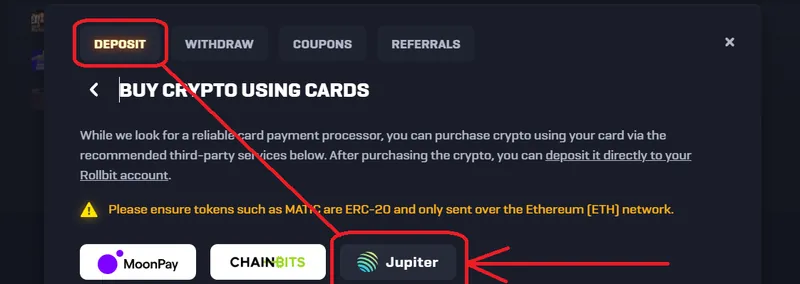
- Open the deposit (buy-crypto) screen and choose the Jupiter on-ramp. This step matters: only the Jupiter option shows the card-wallet methods — the other providers in the menu usually don't.
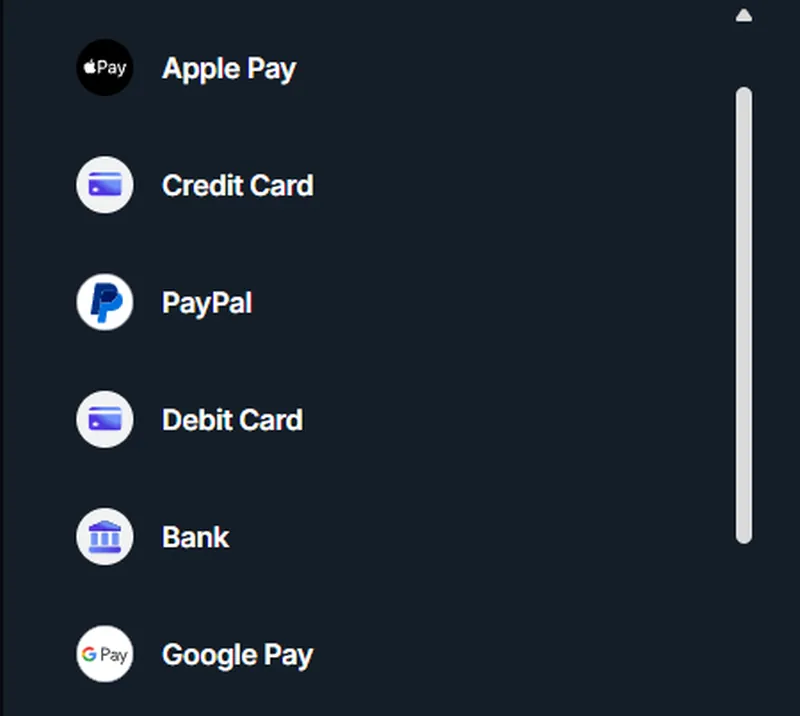
- Pick your method: Apple Pay, PayPal, Google Pay or your Revolut card.
- Enter the amount and confirm the purchase like any normal Apple Pay or PayPal payment.
- The crypto lands in your balance in a moment or two — and you're ready to play.
Open Rollbit and try the Jupiter on-ramp →
Which methods work — and what you need
- Apple Pay — works on iPhone or Mac through the Jupiter on-ramp; confirm with Face ID or Touch ID as usual.
- PayPal — pay from your PayPal balance or a linked account, with no card numbers shared.
- Google Pay — the Android equivalent, a couple of taps to confirm.
- Revolut — use your Revolut card (or the app) at the card step.
Don't have Revolut yet? Get the Revolut app → — it's a free card you can set up in a few minutes.
For why these methods are rare at the cashier and where they do turn up directly, see our notes on Apple Pay, PayPal, Google Pay and Revolut deposits.
The catches — read this first
This is a workaround, not a free lunch. Know the trade-offs before you use it:
- You can't cash out to Apple Pay or PayPal. This route gets money *in*. Withdrawals come back as crypto, not to your card wallet or PayPal — so you'll need a crypto wallet, or to convert it back yourself, to get paid.
- You pay a small spread. An on-ramp adds a margin plus a network fee, so you receive slightly less crypto than the cash you spent. On small deposits that gap is more noticeable.
- It's an extra layer. You're buying crypto first and then playing — one more step than a plain card deposit, and you may need to pass identity verification (KYC) for the purchase.
- Crypto can move. The value can drift a little between buying and playing; usually minor for a quick deposit, but worth knowing.
Is it worth it?
If a card wallet is genuinely the only way you can pay, the Jupiter on-ramp is a clean, legitimate route — and Apple Pay, PayPal, Google Pay and Revolut all work through it. If you just want the simplest possible deposit, a plain Visa or Mastercard or Revolut deposit at a Bonus Crab casino is fewer steps and lets you withdraw the same way. Pick whichever fits — and only ever deposit what you can afford to lose.